
Landscape work orders for HOA and commercial properties
Follow a property request from the manager to the crew and back.
Keep the request, the work update, and the completion record together, so the office can see what still needs a response.
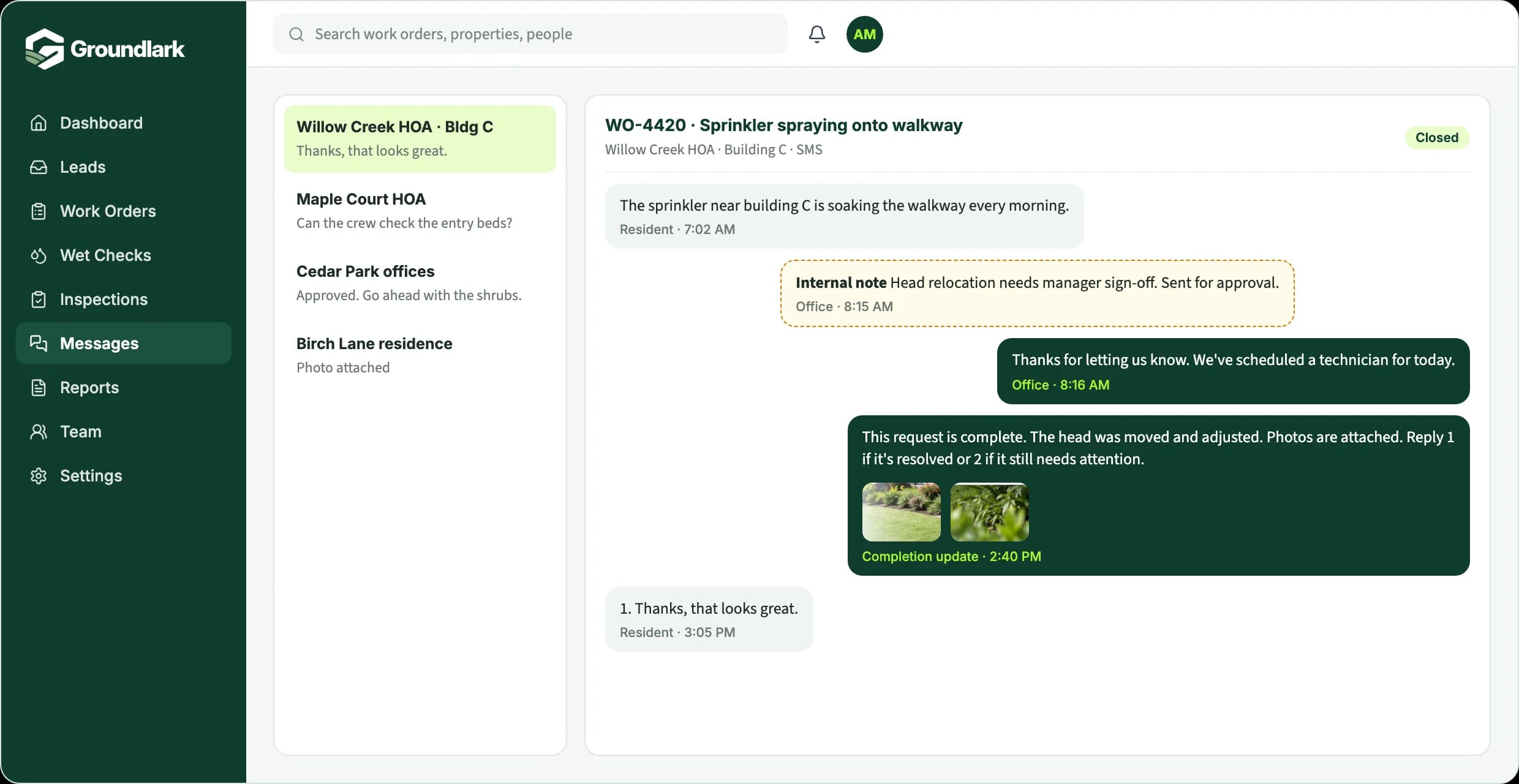
WO-4420
Sprinkler spraying onto walkway
Willow Creek HOA, building C
Problem reported
Sprinkler near building C soaking the walkway every morning.
Resident
Reviewed and sent for approval
Waiting on approvalHead relocation needs the property manager's sign-off.
Office
Assigned and completed
Head moved and adjusted. Photos of the dry walkway attached.
Crew
Manager updated
FinishedProperty manager told the work is complete. Record kept with the property.
Office
Work orders for HOA and commercial landscape contracts
Community and commercial contracts come with more people in the loop: residents who report problems, property managers who approve extra work, crews who do it, and an office that has to answer for all of it. Groundlark keeps each request, its approval, the crew's update, and the completion record together, organized by property.
Residents can submit requests with photos, and the conversation stays on the work order. Internal notes stay internal. When work is finished, the resident or manager gets a completion update with photos, and you have a clear history for every property when the manager asks what was done this month.
For contractors serving communities and managed sites
A resident reports a problem in a common area.
A property manager asks for extra work.
A repair needs approval before the crew can start.
A manager asks what was completed at a property this month.
How it works in Groundlark
The office and the field, on the same job.
In the office
- Organize requests by community or property
- Route repairs that need sign-off to Awaiting Approval
- Keep resident conversations and internal notes on the same job
- Give a community manager access limited to their properties
In the field
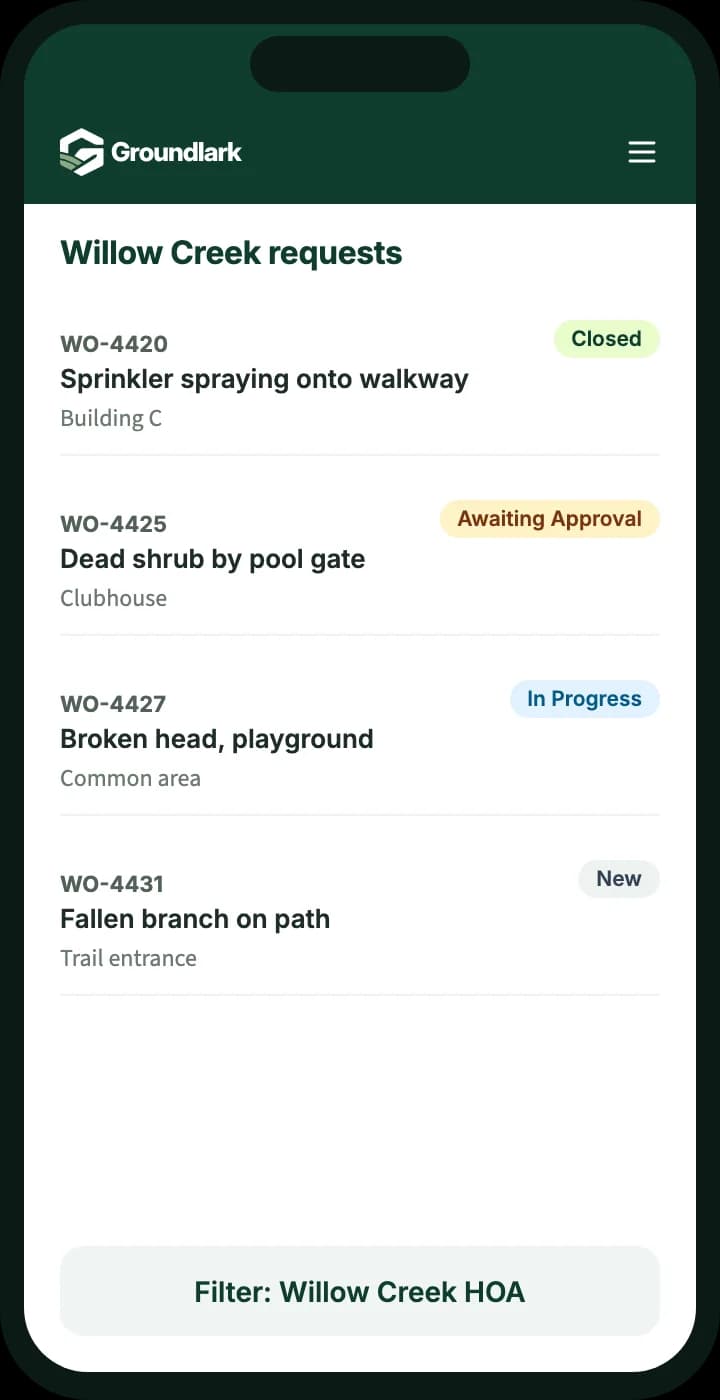
- See requests for each property with location details
- Record the work and add photos on site
- Flag follow-up work found during a visit
- Move jobs forward for approval or closing
Every request, from report to finished.
- Outcome 01
Property and location context
Each request is tied to the property and where on site the problem is.
- Outcome 02
Request ownership
Everyone can see who is responsible for the next step, including approvals.
- Outcome 03
Closing the loop
Field updates and photos stay with the request as its completion record.
What you can track
Resident request intake
Residents submit a request with photos, and it arrives as a work order for the right property.
Approvals and closing rights
Supervisors and admins approve and close work; other roles move it forward.
Community-level access
Limit what each person sees by community or request type.
Completion records
Field notes and photos become the record you share when a manager asks what was done.
Property reports
Prepare community reports as PDF for managers and boards.
Messages that stay on the job
Resident texts and emails, internal notes, and replies live in one thread on the work order.

Why one record helps
Outstanding approvals
Work waiting on a manager's decision is easy to find, so nothing sits unanswered.
Field updates
Crews record what they did and add photos while they're on site.
Answering the manager
When a manager asks what was done at a property, the history is already in one place.
Built from real field work.
Groundlark grew out of a work-order system built for an operating landscape company, where requests, office and crew updates, photos, and approvals were part of the daily routine.
Set up with a person, not a blank account.
We work with you to understand your operation, configure the agreed workflows, and prepare your team to use Groundlark. Every customer completes assisted onboarding before operational access is activated.
How onboarding worksSee it for your work
Request a workflow example.
Tell us a little about how your team handles requests today, and we'll send you a short example of how it would work in Groundlark.
When a property manager reports a problem, how does your team track it through to completion?
Questions
Can a community manager see only their own properties?
Yes. Access can be limited by community or request type, so each person sees the work that's relevant to them.
Does Groundlark handle invoicing or route planning?
No. Groundlark focuses on requests and the work that follows: intake, assignment, field updates, photos, approvals, and customer communication. It doesn't create invoices or plan routes, so it can sit alongside the tools you already use for those.
How would the office and field team use it?
Groundlark is a cloud web application, so the office works from a computer and technicians or crews use a browser on their phone. There is nothing to install. Native iPhone and Android apps are planned for later.
What does getting started involve?
Every customer starts with assisted onboarding. We talk through how your team handles requests today, set up the agreed workflows with you, and train your team before your account goes live.