

Work-order software for irrigation contractors
Keep irrigation service requests and field updates together.
Give the office and technicians one place to follow what was reported, who is handling it, and what happened on the visit.
WC-2087
Wet check, front and side zones
Oak Hollow residence
Wet check recorded
Zones 1–8 run. Two findings noted with photos.
Technician
Zone 4: broken head
FinishedReplaced on site. Coverage checked after repair.
Technician
Zone 7: valve won't shut off
Waiting on approvalValve needs replacement. Return visit required.
Technician
Follow-up repair created
Linked to this wet check so the next visit has the notes.
Office
Irrigation service software built around wet checks and repairs
Irrigation work rarely ends when the visit does. A wet check turns up a broken rotor, a zone that won't shut off, or a controller that needs attention, and that finding has to become a repair someone actually completes. Groundlark gives irrigation contractors one record for each request and each inspection, so findings, follow-up work, and field notes stay connected.
Technicians record zone results and findings on their phone while they're on site. The office sees which items were fixed on the spot, which need a return visit, and which are waiting on approval, without chasing texts or rebuilding notes from a clipboard.
Repairs, inspections, and maintenance in one view
A routine wet check finds a broken head or a leaking valve.
The technician records the finding and flags the follow-up work.
The office can tell completed work apart from a return visit or an item waiting on approval.
The next person at the property can see the earlier request and the repair notes.
How it works in Groundlark
The office and the field, on the same job.
In the office
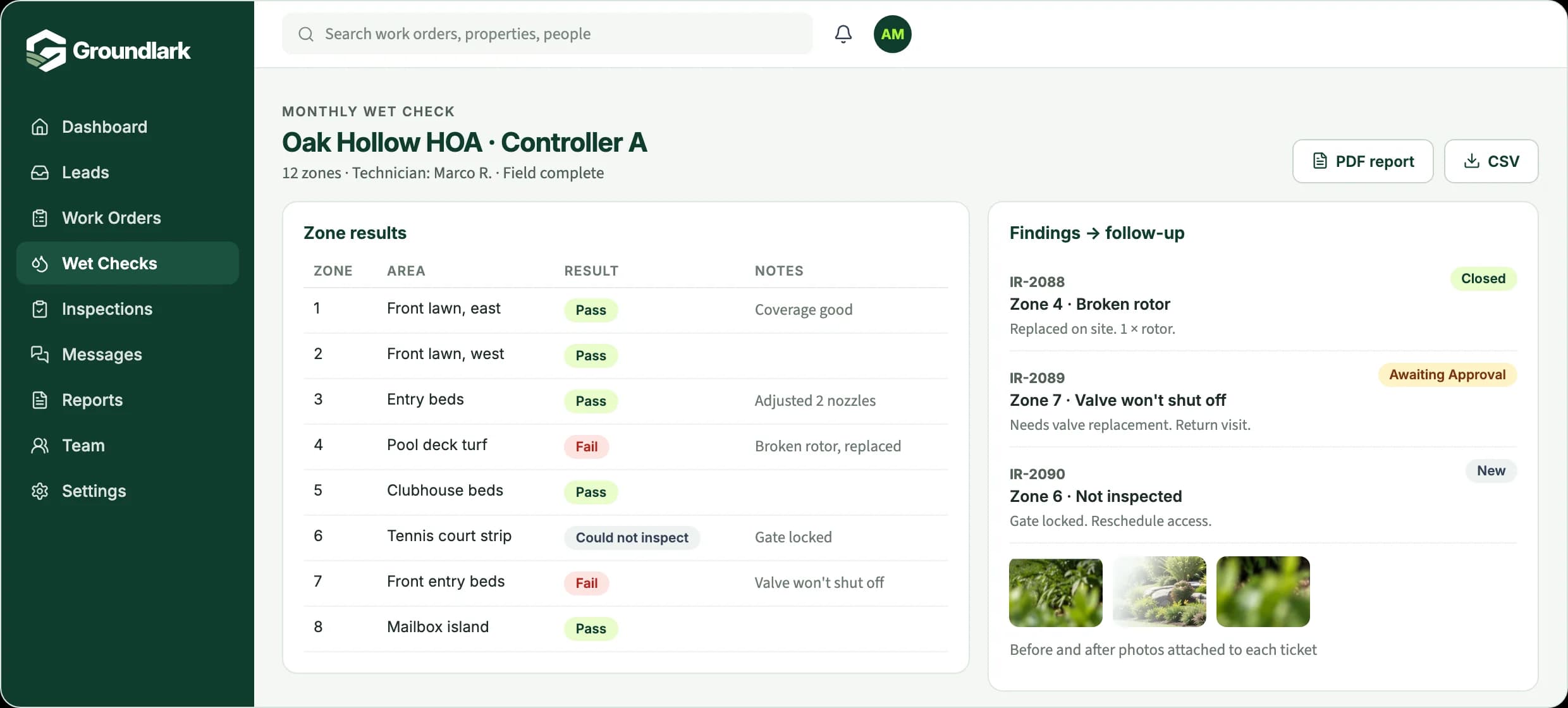
- See every open repair, inspection finding, and return visit by property
- Assign work to a technician and mark urgent items
- Follow each request from New to In Progress, Awaiting Approval, and Closed
- Download wet-check reports as PDF or CSV for the property's records
In the field
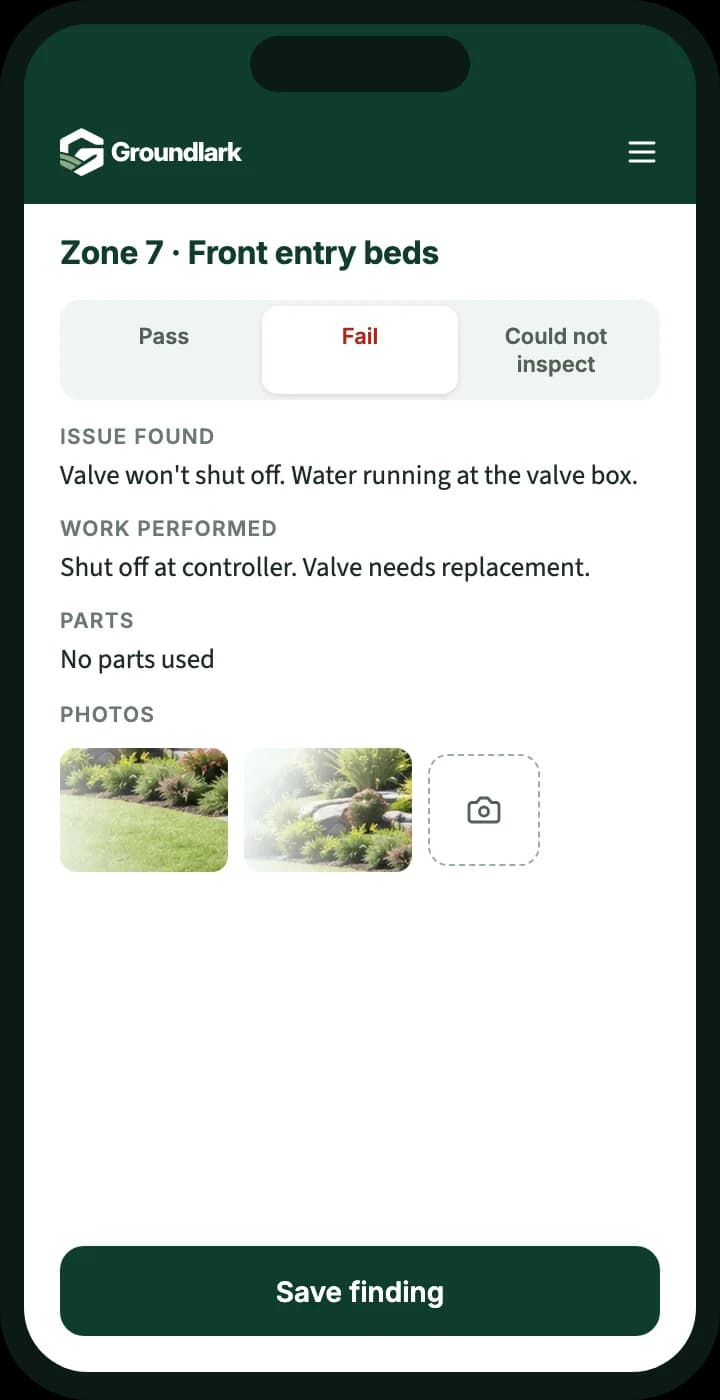
- Record pass, fail, or could-not-inspect for each zone
- Note the issue found, the work performed, and any parts used
- Add before and after photos from the phone
- See earlier requests and notes before arriving at the property
Every request, from report to finished.
- Outcome 01
Understand the request
What was reported, where, and what the technician found, kept with the same record.
- Outcome 02
Know who is handling it
Each repair or follow-up is assigned, so it is clear who owns the next step.
- Outcome 03
See what is finished or waiting
Completed repairs, return visits, and items waiting on approval stay visible to the office.
What you can track
Zone-by-zone wet checks
Record results for each zone, grouped by controller, with notes and photos, and keep a change history.
Findings become repairs
Each problem found on a wet check becomes its own irrigation ticket, so nothing stays buried in an inspection sheet.
Parts on every ticket
Record the parts used on a repair, or mark that none were needed.
Reports you can share
Produce wet-check reports as PDF or CSV for property managers and your own records.
Status everyone understands
New, In Progress, Awaiting Approval, and Closed, with closed work reopened if a problem comes back.
Messages on the job
Two-way text and email threads stay attached to the work order, with internal notes kept separate.


Why one record helps
Wet-check findings
Turn what a technician finds on an inspection into follow-up work without retyping it from a notebook or text thread.
Property and service history
See earlier requests, repairs, and notes for a property before the next visit.
Office-to-technician updates
Notes and photos from the field are there for the office when a customer calls back.
The service calls you already run
Controller problems, pump and well diagnostics, and backflow service calls follow the same request-to-completion path.
Built from real field work.
Groundlark grew out of a work-order system built for an operating landscape company, where requests, office and crew updates, photos, and approvals were part of the daily routine.
Set up with a person, not a blank account.
We work with you to understand your operation, configure the agreed workflows, and prepare your team to use Groundlark. Every customer completes assisted onboarding before operational access is activated.
How onboarding worksSee it for your work
Request a workflow example.
Tell us a little about how your team handles requests today, and we'll send you a short example of how it would work in Groundlark.
When an inspection turns up a repair, how do you make sure it gets followed through?
Questions
Does this work for residential and commercial irrigation?
Yes. Homeowner repairs and work for managed properties both follow the same path from request to finished visit.
Can we produce wet-check reports for property managers?
Yes. Wet-check results can be exported as PDF or CSV, with zone results, notes, and the history of changes.
Does Groundlark handle invoicing or route planning?
No. Groundlark focuses on requests and the work that follows: intake, assignment, field updates, photos, approvals, and customer communication. It doesn't create invoices or plan routes, so it can sit alongside the tools you already use for those.
How would the office and field team use it?
Groundlark is a cloud web application, so the office works from a computer and technicians or crews use a browser on their phone. There is nothing to install. Native iPhone and Android apps are planned for later.
What does getting started involve?
Every customer starts with assisted onboarding. We talk through how your team handles requests today, set up the agreed workflows with you, and train your team before your account goes live.